Reference: Kerberos AAA Object
The following is an example of the AAA Server object used in Lab 3: Kerberos to SAML Lab (the /Common/apm-krb-aaa used in Task 1).
AD User and Keytab
Create a new user in Active Directory
In this example, the User Logon Name kerberos has been created
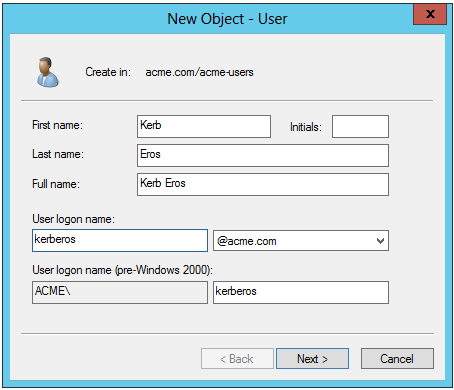
From the Windows command line, run the KTPASS command to generate a keytab file for the previously created user object
ktpass /princ HTTP/kerberos.acme.com@ACME.COM /mapuser acme\kerberos /ptype KRB5_NT_PRINCIPAL /pass password /out c:\file.keytabFQDN of virtual server: kerberos.acme.comAD Domain (UPN format): @ACME.COMUsername: acme\kerberosPassword: passwordReview the changes to the AD User object
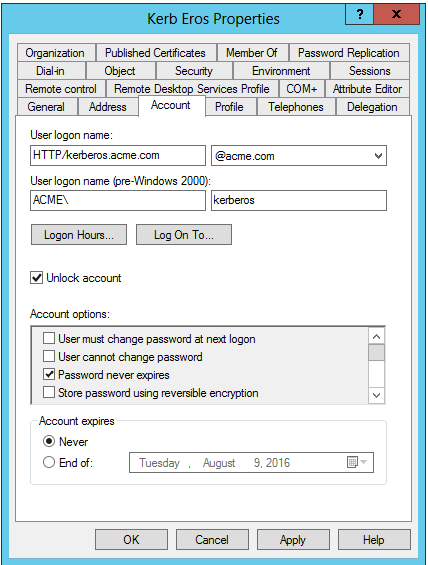
Kerberos AAA Object
Create the AAA object by navigating to Access ‑> Authentication -> Kerberos
Specify a Name
Specify the Auth Realm (Ad Domain)
Specify a Service Name (This should be HTTP for http/https services)
Browse to locate the Keytab File
Click Finished to complete creation of the AAA object
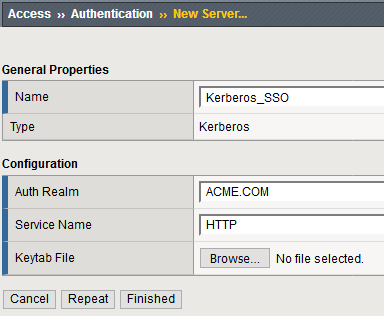
Review the AAA server configuration at Access ‑> Authentication